Log In Start Free
Complete Platform Guide

Master Your Time in 4 Simple Views

LoricaVallo transforms chaos into clarity with a connected system for planning, executing, capturing ideas, and growing. Each view serves a distinct purpose, working together to protect your most valuable asset: time.

The 4-View System

Most productivity tools are scattered. LoricaVallo connects your daily actions to your bigger goals through four integrated views.

01

Blueprint: Architect Your Perfect Day

The Problem

Ever end a day wondering where all your time went? Meetings hijacked your morning, emails consumed your afternoon, and your important work never happened. Without a plan, you're at the mercy of everyone else's priorities.
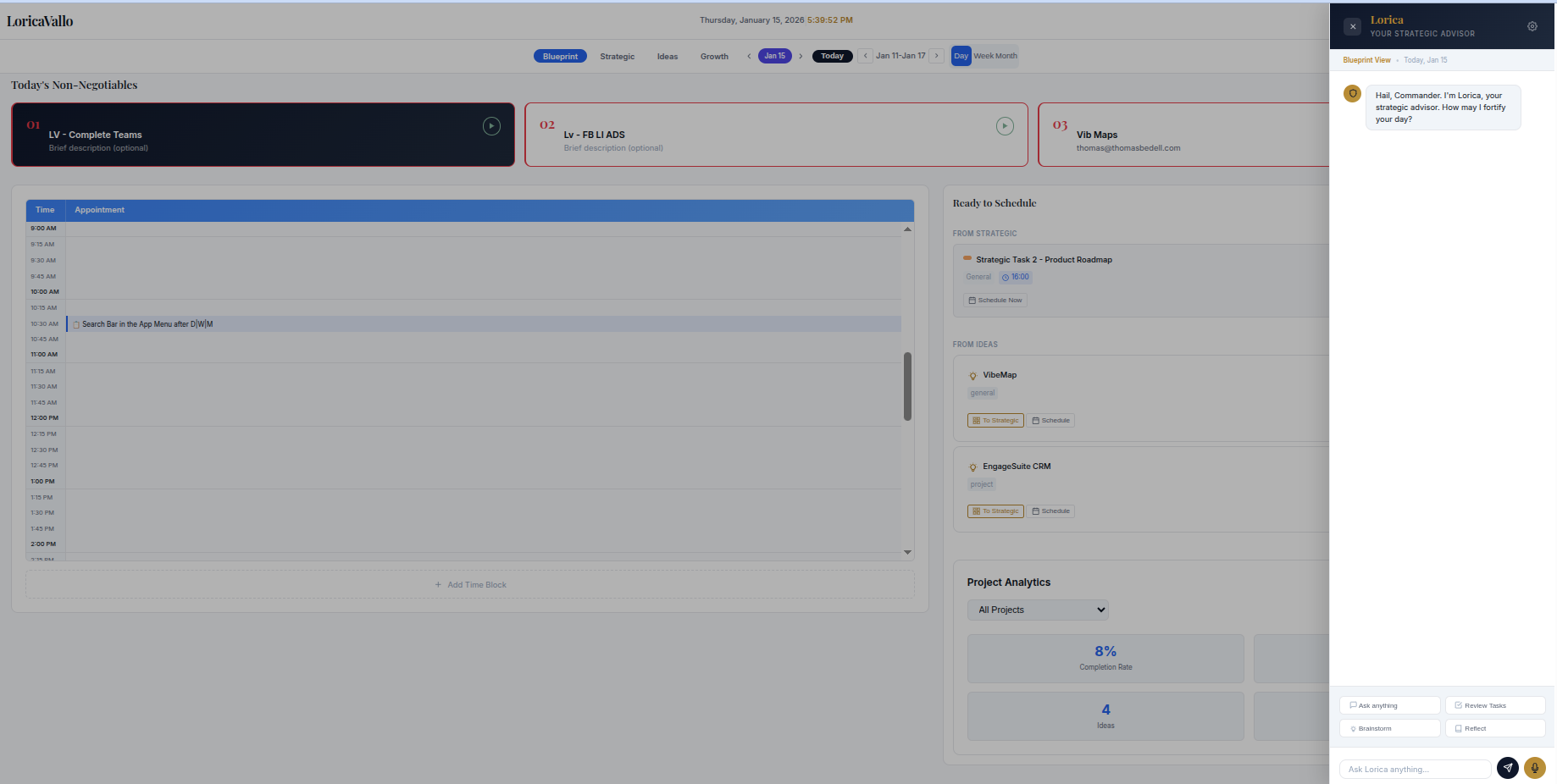
Blueprint Day View - Daily scheduling with time blocks and non-negotiables
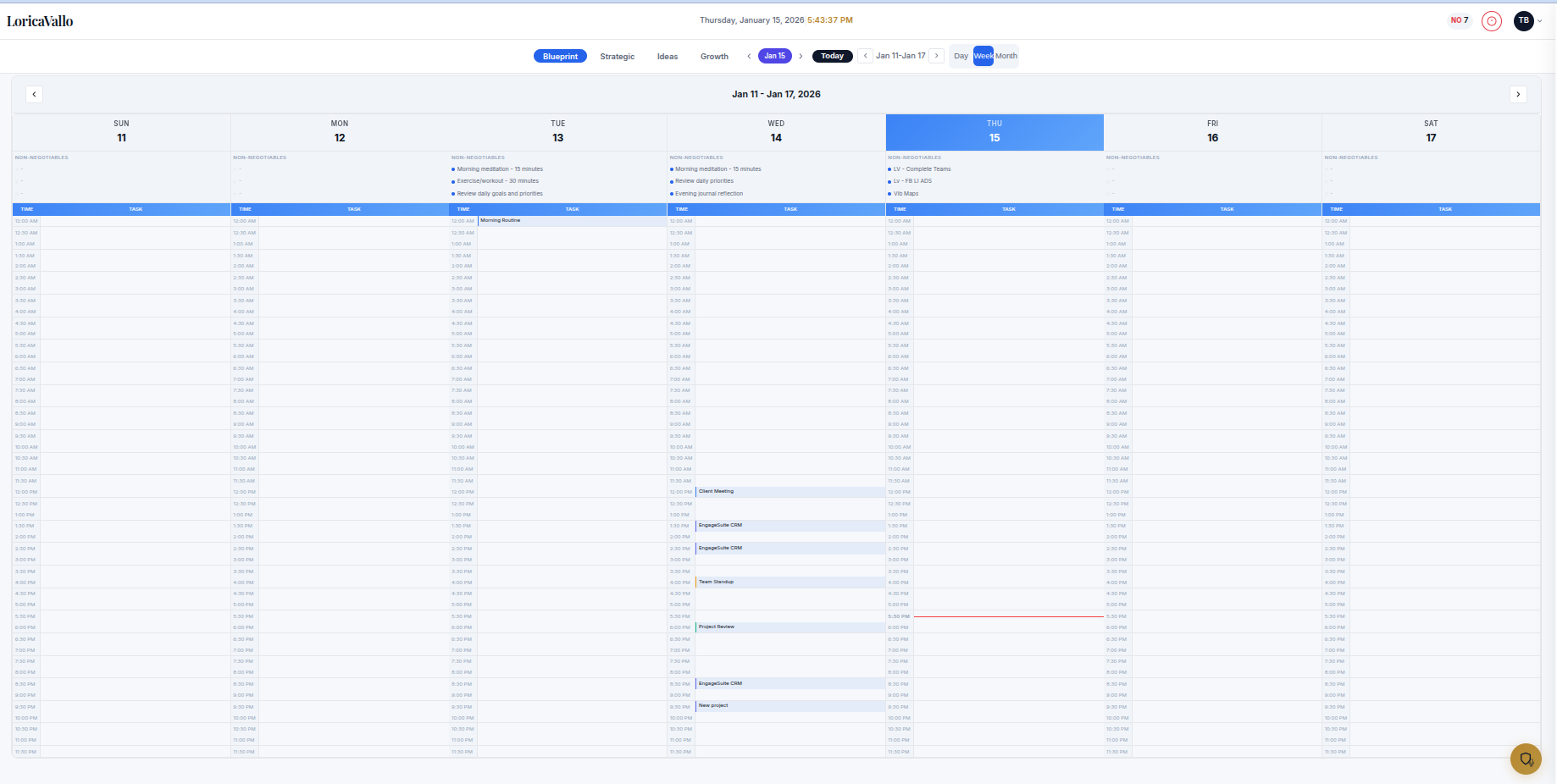
Blueprint Week View - Weekly overview with non-negotiables
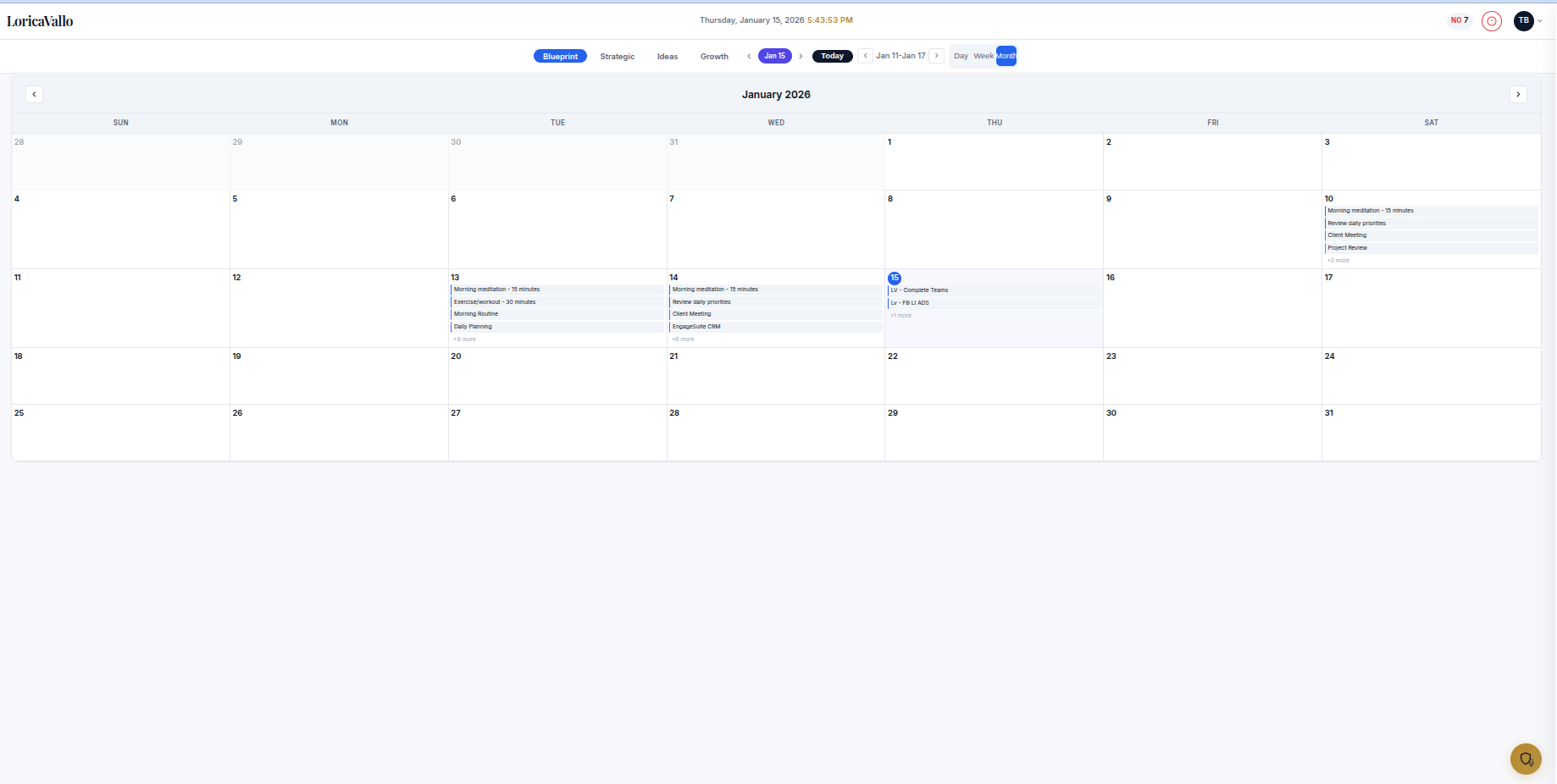
Blueprint Month View - Monthly calendar
1

Non-Negotiables (Top 3)

Lock in your top 3 priorities before the world intrudes. Color-coded cards (01, 02, 03) that you can start and complete. No more than 3 forces ruthless prioritization.

2

Time-Blocked Calendar

See exactly where every minute is allocated. 15-minute increment schedule with visual time blocks. Click any slot to add a time block instantly.

3

Day / Week / Month Views

Toggle between calendar perspectives. Day for execution, Week for planning, Month for the big picture. Your non-negotiables appear across all views.

4

Ready to Schedule Panel

Cards from Strategic and Ideas waiting to be scheduled. Drag them to your calendar or click to add. Never lose track of what needs doing.

5

Project Analytics

Track completion rates, active tasks, and ideas count per project. Real data showing your productivity patterns and progress over time.

6

Lorica AI Assistant

Your strategic advisor for planning and reflection. Quick actions for brainstorming, reviewing tasks, and getting unstuck. Context-aware suggestions based on your data.

Pro Tip

Set your Non-Negotiables the night before. When you wake up, your battle plan is already waiting. Execute, don't decide.
02

Strategic: Command Your Task Universe

The Problem

Your to-do list is a graveyard of good intentions. Tasks pile up, priorities blur, and you're constantly fighting fires instead of making progress. There's no distinction between urgent and important, so everything feels equally overwhelming.

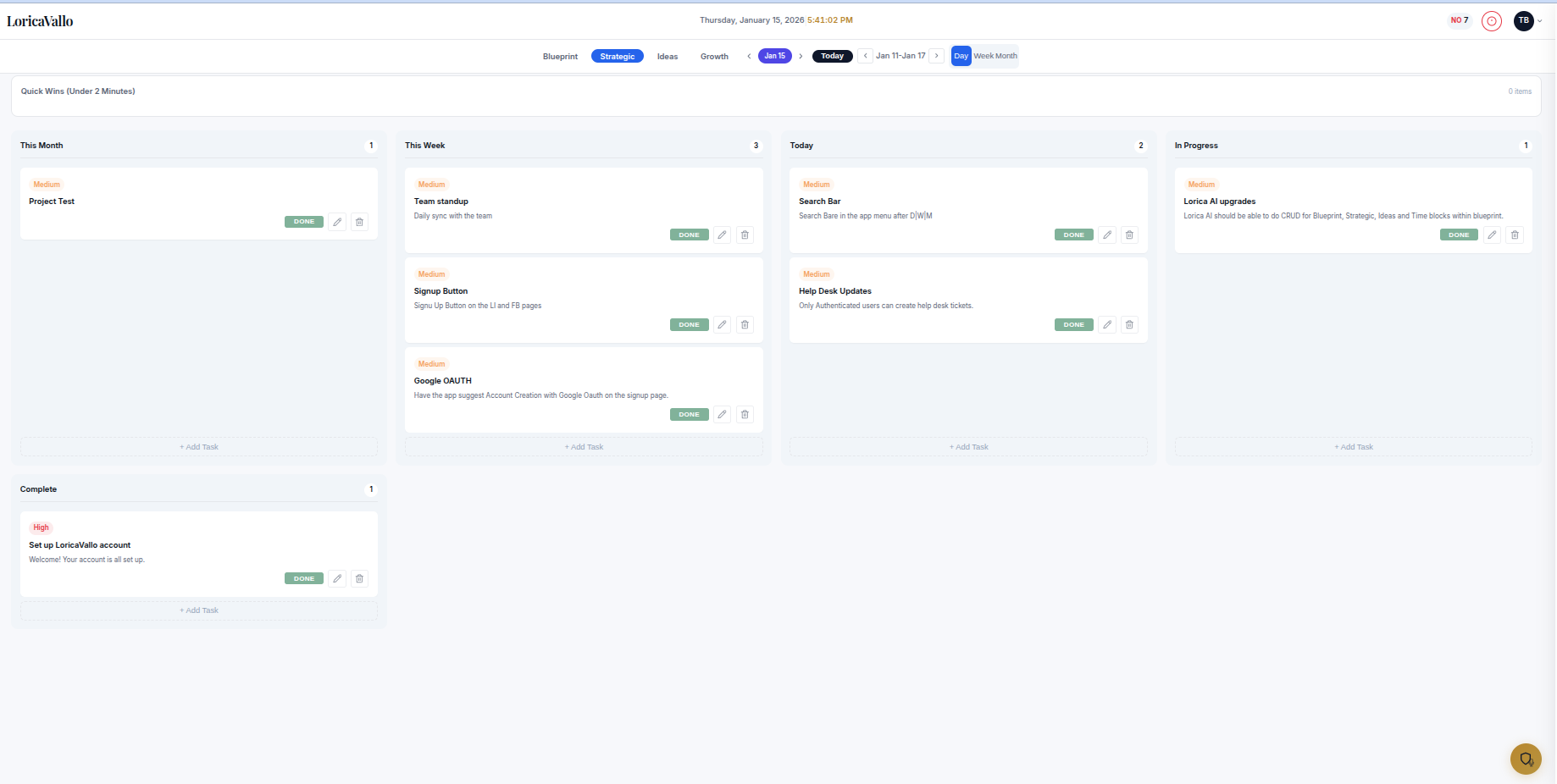
Strategic View - Kanban board with time-horizon columns
1

Time-Horizon Columns

See what's due This Month, This Week, Today, In Progress, and Complete. Tasks flow naturally from distant to immediate. Never wonder what to work on next.

2

Quick Wins Section

Tasks under 2 minutes for momentum. Start your day by knocking out quick wins. Small victories build momentum for bigger challenges.

3

Priority System

Visual indicators (High/Medium/Low with colors) let you know what's urgent vs. important at a glance. Combined with project badges for full context.

4

Drag & Drop

Reprioritize as circumstances change. Move tasks between columns by dragging. Life is unpredictable; your task system should be flexible.

5

Schedule to Blueprint

Move tasks to your Ready to Schedule panel in Blueprint. When it's time to execute, your tasks are waiting on your calendar.

6

Project Organization

Assign tasks to projects with color-coded badges. Filter by project to focus on one area at a time. See all tasks across projects or drill down.

Pro Tip

During your weekly review, move tasks from "This Month" to "This Week" based on your calendar availability. Then each morning, pull 3-5 tasks into "Today."

03

Ideas: Never Lose a Brilliant Thought

The Problem

Great ideas strike at the worst times: in the shower, during meetings, at 3am. By the time you can act on them, they've evaporated. Your ideas are scattered across notebooks, apps, sticky notes, and forgotten voice memos.

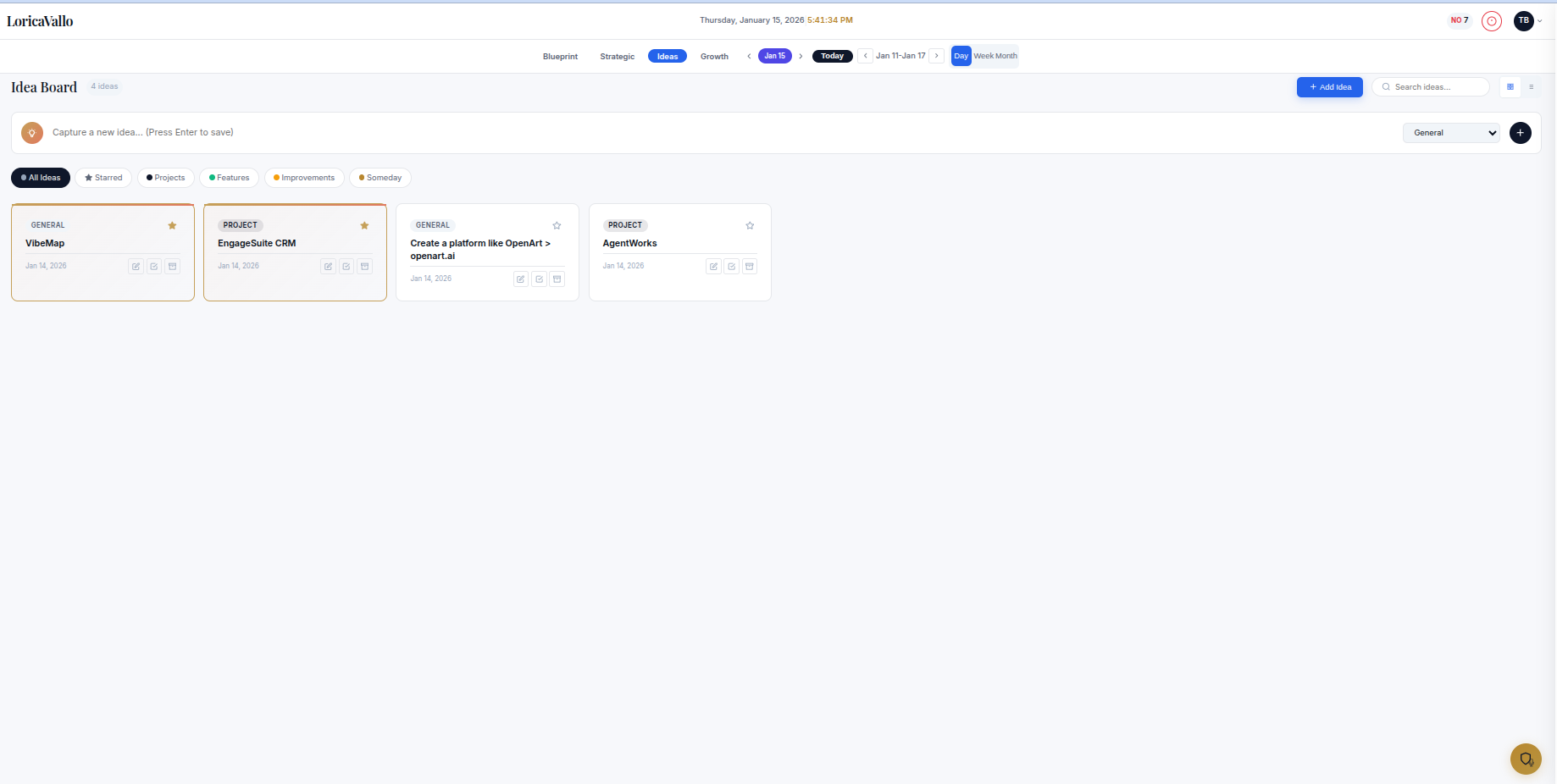
Ideas View - Capture and organize ideas with categories
1

Quick Capture Input

One input field, instant save. Press Enter to capture. No friction between thought and capture. Get it out of your head and back to what you were doing.

2

Category System

Organize by type: All Ideas, Starred, Projects, Features, Improvements, Someday. Filter to find exactly what you need when you need it.

3

Star/Favorite System

Mark VIP ideas for quick access. When inspiration strikes or you have time to act, your best ideas are one click away.

4

Promotion Flow

Convert ideas to Strategic tasks or schedule directly to Blueprint. The path from idea to execution is seamless and connected.

5

Priority & Project Tags

Assign priority levels and projects to ideas. Know which ideas are urgent and which project they belong to before promoting.

6

Search & Archive

Find any idea instantly with search. Archive ideas you're not ready to act on but don't want to lose. Nothing disappears forever.

Pro Tip

Review your Ideas view weekly. Star the top 3 you want to pursue, archive anything older than 90 days you haven't acted on. Keep your idea inventory fresh.

04

Growth: Learn From Every Day

The Problem

You make the same mistakes repeatedly. Wins go uncelebrated. There's no system to extract lessons and actually improve. Without reflection, you're doomed to repeat the same patterns that hold you back.

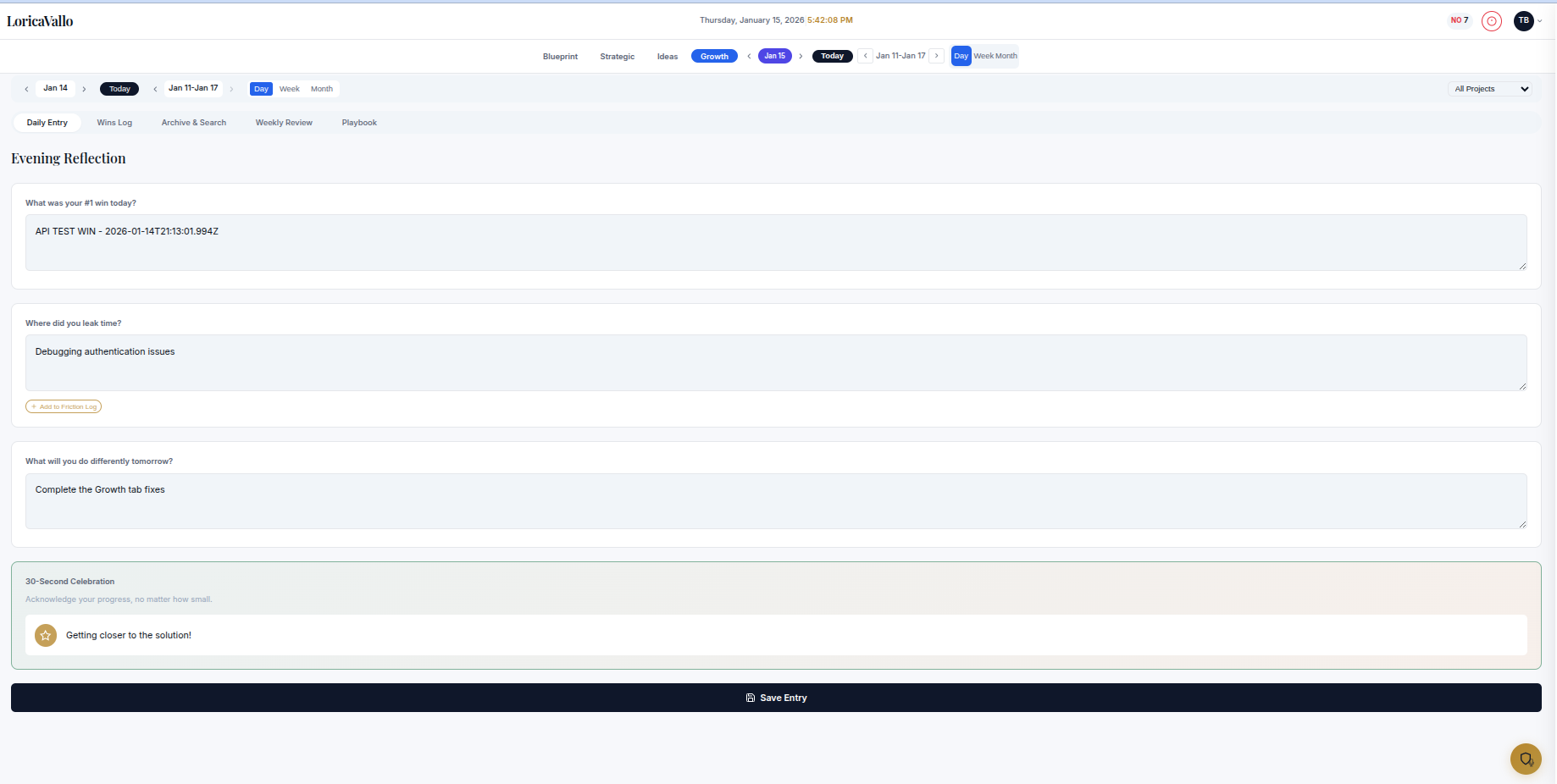
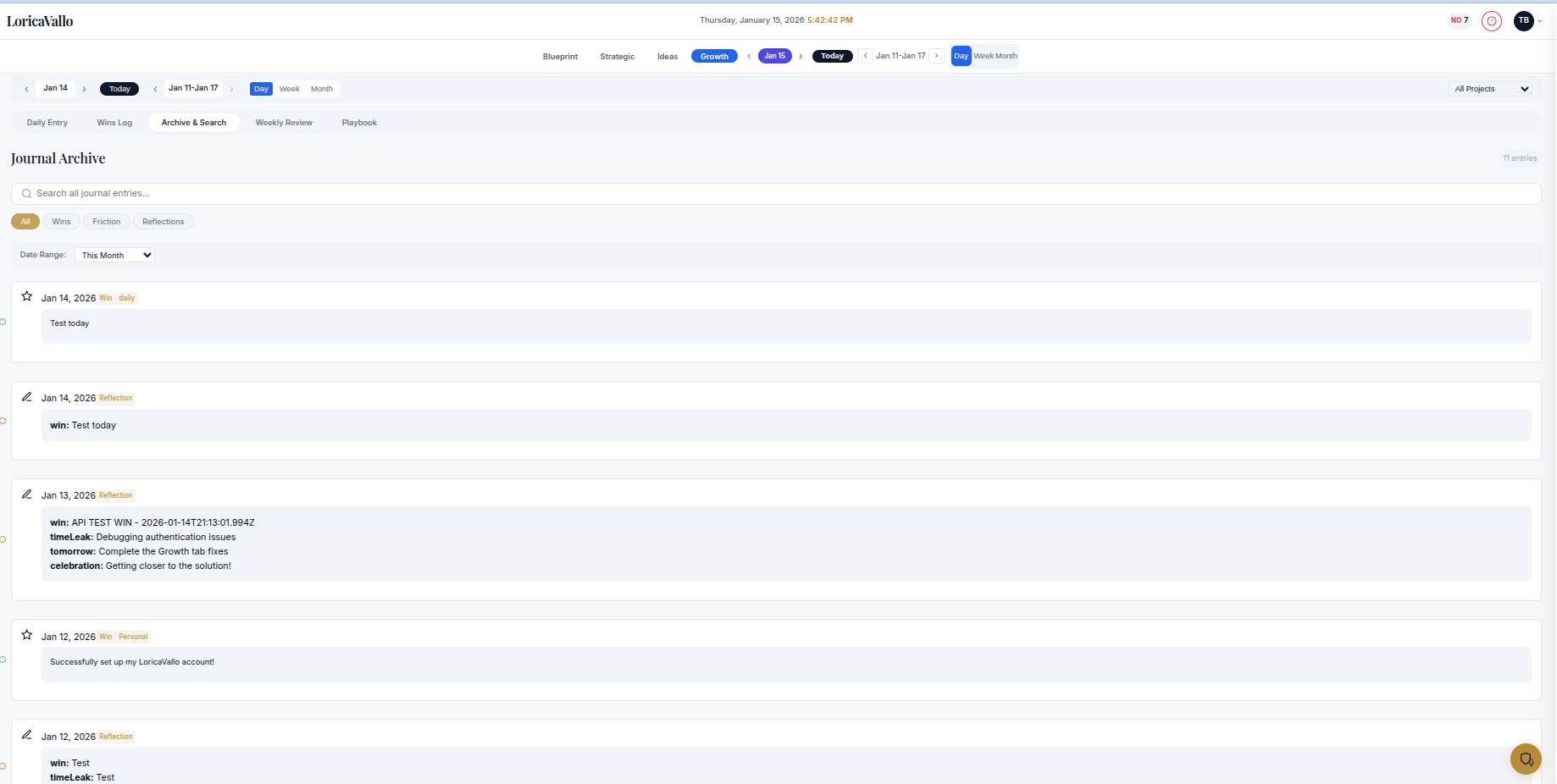
Growth Daily Entry - Evening reflection prompts
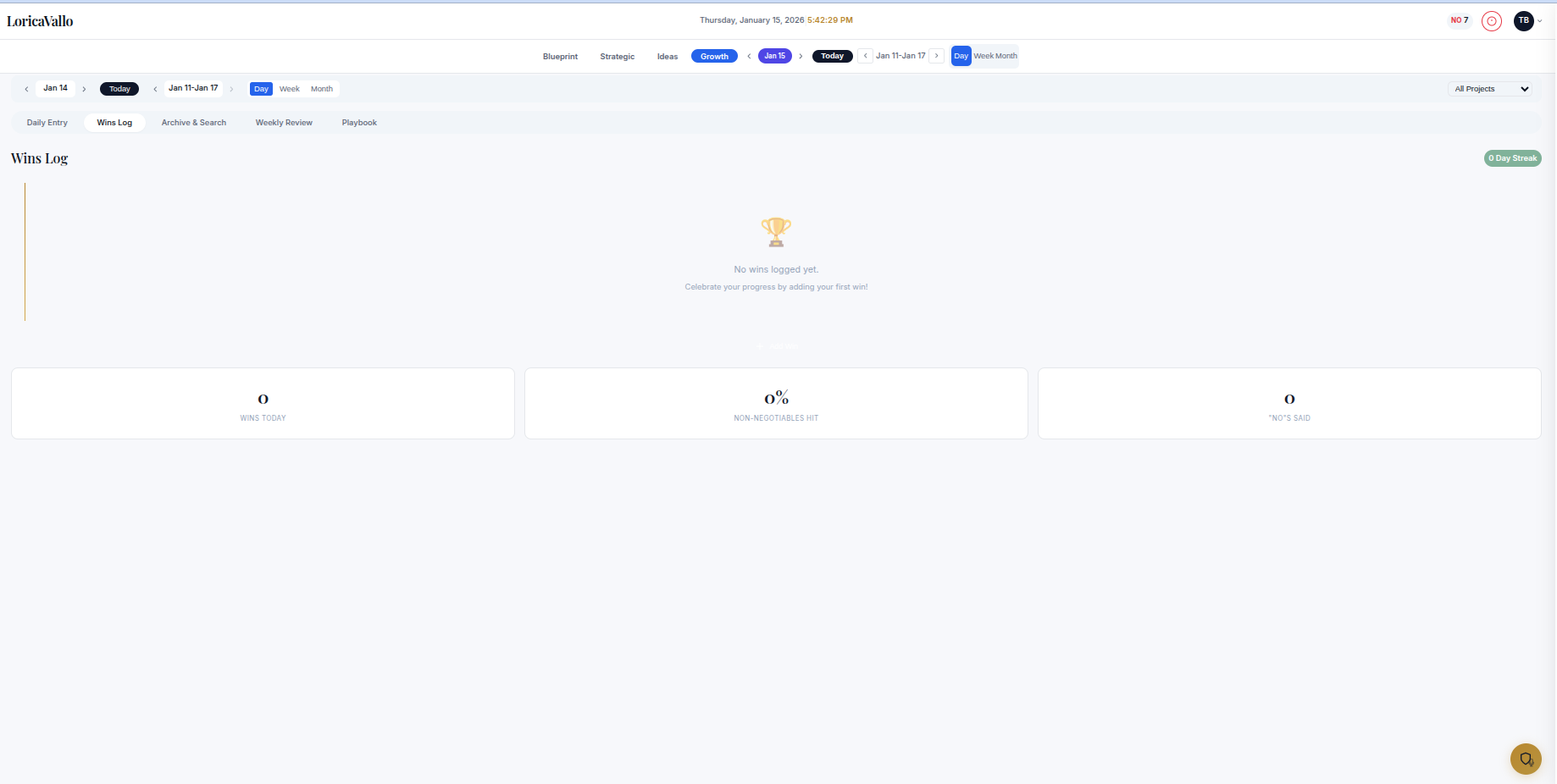
Growth Wins Log - Track wins and build streaks
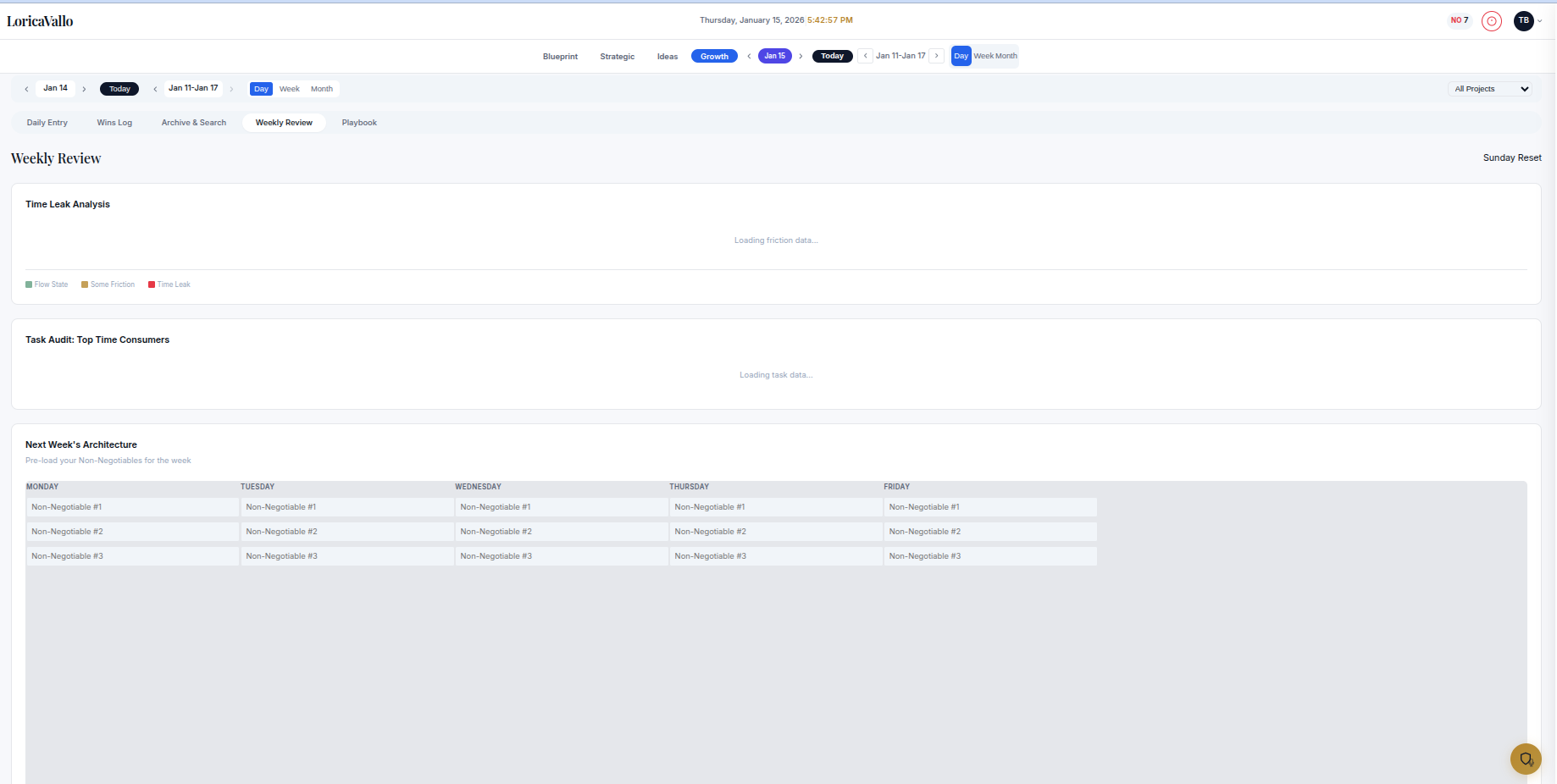
Growth Weekly Review - Plan and analyze your week
Growth Archive - Search past entries
1

Evening Reflection

Four questions to close every day with intention: What was your #1 win? Where did you leak time? What will you do differently? Plus a 30-second celebration prompt.

2

Wins Log

Track daily wins and build streaks. Celebrate progress, no matter how small. Seeing your wins accumulate builds momentum and confidence.

3

Time Leak Analysis

Identify where time escapes. Track friction points that slow you down. Patterns emerge that reveal what to eliminate or automate.

4

Weekly Review

Task audit, time analysis, and next week planning. Pre-plan your Non-Negotiables for the upcoming week. Enter Monday with a complete battle plan.

5

Playbook

Save lessons learned for your future self. Create repeatable processes from your best weeks. Build a personal operating system over time.

6

Archive & Search

Searchable journal history with filters (All, Wins, Friction, Reflections). Find patterns across weeks and months. Your growth data is always accessible.

Pro Tip

Set a recurring 10-minute block at the end of each day for reflection. Consistency compounds. After 30 days, you'll have data-driven insights into your productivity patterns.

The Connected System

The magic happens when the four views work together. Here's how a single idea flows through LoricaVallo.

1

Capture

A brilliant idea strikes while you're in a meeting. Open Ideas, type it in, press Enter. Back to the meeting in 3 seconds. The idea is safe.

Ideas View
2

Promote

During your weekly review, you decide this idea is worth pursuing. Click "To Strategic" and it becomes an actionable task in your This Month column.

Strategic View
3

Schedule

On Sunday evening, you pull the task into your Blueprint for Tuesday at 2pm. It appears as a time block on your calendar, ready to execute.

Blueprint View
4

Complete & Celebrate

Tuesday at 4pm, you finish. Mark it done and it automatically logs as a Win in Growth. That night, you reflect on what made it possible.

Growth View

From random thought to celebrated achievement in a seamless flow. No more lost ideas. No more forgotten tasks. No more uncelebrated wins.

Ready to Transform Your Productivity?

Join thousands of high performers who've built their defensive perimeter with LoricaVallo. Start free, upgrade when you're ready.

No credit card required. Free tier includes all 4 views.